Device Setup & Care
Congratulations! We recommend that you navigate to zerenelife.com/welcome using a tablet or computer for step-by-step instructions. Also, here’s a video of a device unboxing and assembly for your convenience.
Here’s a quick explanation of how you should connect your Zerene Device to your Zerene App:
Here’s a quick explanation of how you should create your Zerene program, and how to understand each part of the program (study, train, and maintain).
We recommend 5 days. The “baseline” is where we can observe and understand your usual teeth clenching/grinding behavior. Think of it as a “before” picture. Itll help us thoroughly understand where we are now so that we can know whether or not progress has been made later. That way we can make adjustments based on data and facts rather than on guesses.
We recommend at least 9 days. Think of it as building a new habit. Zerene is helping you learn to have the habit of a relaxed jaw in your sleep. Just as we rarely get into a habit of working out or eating healthy overnight, we can’t expect to form a new habit with our jaw muscles overnight either! Still, it is amazing that we can see good results in as few as. days.
Cleaning your Zerene is fast and easy. You should rinse your mouthguard in warm water after each use. You can gently remove the pressure tube from the mouthguard in order to rinse the straw, clean inside the area where the tube inserts into the mouthguard, and avoid getting the module wet. See our 1-minute video for more details:
Changing your pressure tube is fast and easy.
- Unlock the old tube by gently rotating it counterclockwise at the base of the module
- Lock on the new tube by aligning the notches to put it onto the module, then rotate clockwise till the tube locks in securely.
Here’s a short video of the process:
Congratulations! This is where Zerene can help you learn to stop clenching/grinding your teeth in your sleep. Start by tapping “Start Session” on the homepage of the Zerene app. From there the app will guide you. Here’s a short video that shows how to start and end your first Study Mode session:
Congratulations! This is a very exciting moment in your journey with Zerene. Start by tapping “Start Session” on the homepage of the Zerene app. From there the app will guide you. Here’s a short video that shows how to start and end your first Zerene session:
Yes. The pressure straw is a replaceable component and may need to be changed from time to time depending on the level of teeth clenching and grinding activity. The Zerene app will notify you when it’s time to replace the straw. A typical replacement interval for the pressure straw is every 15 sessions. If you have questions about replacement or usage, feel free to reach out to the coach at coach@zerenelife.com.
If you wake up during the night, you can keep your Zerene device in place for short breaks such as using the bathroom or grabbing a glass of water. For longer breaks—like walking the dog or being up for an extended period—remove your device and store it in a safe location, out of reach of children and pets.
Do not end your session in the app during these breaks. Simply leave the session running, and when you return to bed, reinsert your Zerene and continue your night’s rest. Once you’ve completed your sleep, open the app and select “End Session” to properly close out your usage.
I’m feeling some discomfort or irritation where the tube touches my lips. Is this normal?
Yes — this may happen, especially when first starting. Some users experience a short adjustment period (often 3–7 days) as the lips and surrounding skin desensitize. It’s similar to getting used to a new pair of glasses or a dental appliance: noticeable at first, then increasingly easy to ignore over time.
What can I do to make the tube feel more comfortable?
If the sensation feels distracting or irritating, many users have found the following approaches helpful:
Use light lubrication
Apply a very thin layer of petroleum jelly (Vaseline) or a fragrance-free lip balm to the outside of the tube at the exact point where it contacts the lip. This reduces friction and prevents tugging on the skin. Only a small amount is needed.Allow gradual adaptation
If you’re new to Zerene, you may find it helpful to use the device in shorter sessions initially, allowing your lips to adapt gradually before longer overnight use.Pay attention to sleep position
Side or stomach sleeping, or pressure from pillows, can push the tube against the lip during the night. Adjusting pillow placement or head position can reduce external pressure on the tube.What if the discomfort doesn’t go away?
If you’ve tried the tips above and the tube still feels awkward or irritating, some users choose to use an opposing guard, which can improve overall comfort.
For example:
- If you currently use Zerene with an upper guard, switching to a lower guard may change how the tube exits the mouth.
- This can help redistribute forces and subtly lift or angle the tube away from more sensitive areas of the lip.
Please note that switching to or adding an opposing guard is an optional hardware change and is available for an additional fee. The Zerene support team can help determine whether this option is likely to be beneficial before you make a decision.
When should I contact Zerene?
A brief adjustment period is normal — but you shouldn’t be in ongoing discomfort or pain.
If irritation persists, worsens, or doesn’t improve after trying the steps above, please contact the Zerene support team. We’re happy to help troubleshoot fit and positioning, and to discuss whether adjustments or an opposing guard might be a good option for you.
- If you currently use Zerene with an upper guard, switching to a lower guard may change how the tube exits the mouth.
During normal use while sleeping the Zerene can bend on its tube, however they’ve been designed and tested to handle this type of loading. The focus of this FAQ is to provide instructions on the insertion and removal of the tube
Please treat the pressure tube with care. It contains a sealed sensing chamber that needs to remain airtight for accurate performance.
When locking or unlocking the tube, always hold the twist-lock plastic (light plastic base) while twisting.
For straight insertion or removal (a simple push or pull), light pulling on the thin black tube during normal use is okay. However, do not twist the black tube itself, as this can stress the internal seal and may cause a small air leak that affects sensing accuracy.
Also avoid excessive bending, especially near where the black tube meets the twist-lock plastic housing. Gentle curves are fine, but sharp bends or repeated flexing in the same spot should be avoided.
Using the twist-lock plastic housing as your grip point whenever rotating or locking the tube will help ensure long-term performance.
If you ever notice unusual readings (unlocking and removing the tube should drop the pressure to ~0 to -500. Inserting and locking the pressure tube should result in a pressure > 5K. Comfortable squeezing of the tube with fingers should result in at least 5K-10K of pressure increase) in the app and are unsure whether handling may have affected the tube, contact Zerene Support and we’ll be happy to help.
Please note that the pressure tubes are wear components and typically last 10-20 or more sessions.
Zerene is designed for comfort, but minor variations can occur. If you notice a spot that feels rough, the soft EVA material allows for simple at-home adjustments. You can gently smooth the area with fine sandpaper. If you choose to trim the spot with scissors, we recommend lightly sanding it afterward to ensure a smooth finish. Rinse the mouthguard thoroughly with water before use after any adjustment.
Understanding the Data
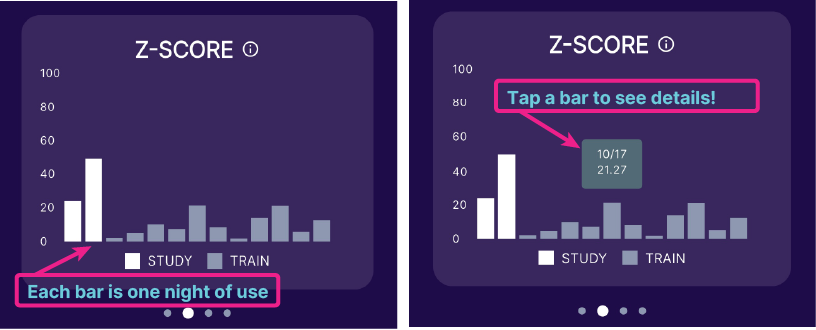
The Z-Score is an at-a-glance way to give a numerical value or score to your teeth clenching/grinding. It combines data about how hard and long you bite each time you sleep and divides it by the number of hours you slept. That allows you to quickly and easily compare your teeth clenching/grinding night by night to recognize trends like improvement or worsening.
It is important to look for trends in your data over time. Various factors impact our sleep quality, our stress levels, and other things that can cause us to clench/grind our teeth more or less on an individual sleep. You may even notice or remember having a particularly stressful day, having consumed more caffeine than usual, or not having gone through your usual sleep routine. The opposite can also be true – you might have had a particularly relaxing and stress-free day where your eating and sleeping habits were all excellent. Just as those days might not represent the normal states of life, days when your Z-Score is particularly high or particularly low might not represent the true state of your teeth clenching/grinding UNLESS they are part of a larger trend.
When you use your Zerene in training mode, the goal is to see a Z-Score that gets lower than from your baseline and then generally stays pretty low relative to your baseline. A single night that is higher is not necessarily cause for concern. Keep going with your training and keep an eye on the trend. If you become concerned please reach out to the Zerene Coach.
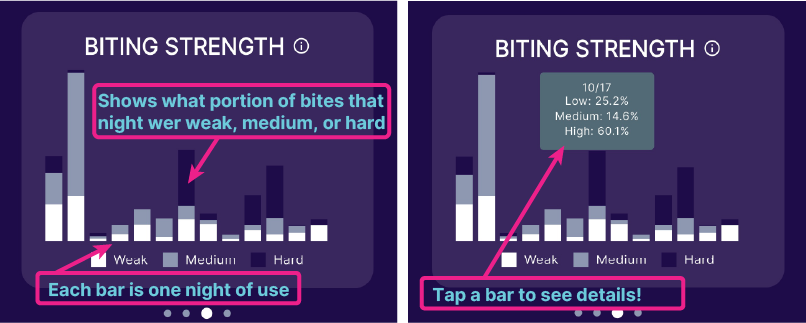
When Zerene measures your teeth clenching/grinding it categorizes your bites as Weak, Medium, and Hard, depending on how hard you bite. This data can help you to develop a more personalized understanding of your clenching/grinding behavior. Generally with the Zerene behavior the goal is to observe fewer bites overall, and especially fewer strong and medium bites.
Zerene compares the Z-Score data collected in study mode during your initial use (your baseline that was collected without the biofeedback from the device) to the data collected in training mode (when the device gives you vibration feedback anytime you clench/grind in your sleep). The comparison allows you to quickly and easily see whether/how much your average Z-Score has changed as a result of your training.
Great question! Please see the video below where Zerene Head of Software, Steve Sulack, walks us through how we used the data, training settings, and feedback from a beta user to better understand their teeth clenching/grinding, and get a great result from training.
Zerene Use FAQs
You may need to charge the device for up to an hour before starting a session, if your app indicates that the Zerene battery is too low to resume. It is OK to leave your Zerene plugged into the USB charge cable when not in use.
Your data will populate in your app as you use your Zerene. Please note the Progress graphic may be delayed as this requires several nights of use prior to becoming available.
For some folks, it takes a few days to get accustomed to wearing a Zerene. If the discomfort is too much, stop using the device and contact support@zerenelife.com.
Deleting your account is easy. Log into the Zerene app, select the More menu at the bottom. Then select Account -> Delete Account.
The communication between your Zerene module and your phone happens via Bluetooth communication. Therefore, Bluetooth needs to be enabled when using Zerene.
2.5 hours. For a night of sleep to count and advance your Zerene schedule, you need to sleep for at least 2.5 hours.
Changing your notifications is easy. Log into the Zerene app, select the More menu at the bottom. Then select App Settings to adjust your notification settings.
Log into the Zerene app, select the More menu at the bottom. Then select App Settings -> Logout from account.
Feel free to reach out to Zerene anytime at support@zerenelife.com. Please allow up to 72 hours for a response. Thank you!
If you wake up during the night, you can keep your Zerene device in place for short breaks such as using the bathroom or grabbing a glass of water. For longer breaks—like walking the dog or being up for an extended period—remove your device and store it in a safe location, out of reach of children and pets.
Do not end your session in the app during these breaks. Simply leave the session running, and when you return to bed, reinsert your Zerene and continue your night’s rest. Once you’ve completed your sleep, open the app and select “End Session” to properly close out your usage.
This device contains a built-in rechargeable lithium-ion battery and should not be placed in household trash or curbside recycling. To dispose of it safely, take the entire device to an approved electronics or battery recycling drop-off, such as a participating retailer (e.g., Home Depot, Lowe’s), a municipal hazardous waste facility, or a program like Call2Recycle or Earth911. Do not attempt to remove the battery.
Zerene can only operate on one phone at a time. However, if you need to switch to a new device, follow these steps. After installing the app on your new device, go directly to the “More” menu and expand the “Account” tile. Click on the “Restore Data” option in the list. That will copy your device settings from the cloud to your new device and return you to the home screen after restoring your data. If you do not see your data, or if you are trying to switch platforms (e.g., iOS to Android), please reach out to us.
Impression Kit FAQs
Place the impression tray options in your mouth. Select the tray that accommodates your teeth and is able to wiggle more (this means that the impression silicone will be able to reach all parts around your teeth when molded).
Try to place your teeth in the middle of the impression tray. Using a mirror may be helpful.
Bite down until the entire silicone reaches past your gum line.
Use the spare silicone provided. Make sure to work more quickly and have the impression tray handy so that you are able to take the impression before the silicone hardens.
We recommend biting while taking the impression since this permits you to hold the impression tray steady for the few minutes it takes for the silicone to cure.
It is made of food-grade materials, and can be disposed of in a conventional manner.
You can recycle the cardboard packaging. Other materials can be disposed of in a conventional manner.
Reach out to support@zerenelife.com indicating your circumstance.
App Warning FAQs
After a session, your Zerene will take a few seconds to clear memory and prepare for the next session. Please be patient, this may take up to 30 seconds. If the issue persists, please plug-unplug your module to the USB cable to reset your module.
The Zerene is detecting lower than expected pressure inside your pressure straw. Please confirm that your pressure straw installed. Try remove and reapplying your pressure straw. Occasionally, this reseats the seal, and the device resumes normal operation. If reseating your pressure tube doesn’t solve the problem, please apply a new pressure tube.
If the issue persists, please contact support at support@zerenelife.com.
Your Zerene module can store up to two nights of data in module memory. Thereafter, it must move data to the phone to clear space for another run. When connected to your app, please allow downloading to complete prior to starting your next session. Thank you.
Your Zerene is showing a low battery state. Please charge your Zerene to ensure that your module can continue to log data for the full duration of sleep. This may take up to one hour of charge time.
When you plug in your Zerene to the USB cable, please ensure that the amber light flickers on your Zerene module indicating that charging has started. If you do not see the amber light flicker, please try a different cable or charger.
Zerene cannot be used while plugged in and charging. Please unplug your Zerene to resume.
Your Zerene schedule is in an unknown state. Please contact Zerene support for assistance: support@zerenelife.com.
The Zerene is reporting that the module is in an unexpected orientation to start use. Please ensure that the USB connector is pointed down when you are wearing your Zerene. If the USB connector is facing up, please remove the module and pressure straw from the nightguard, flip 180 degrees, and reinsert.
General FAQs
Our device is not currently FDA cleared or approved. It is intended to be used as a general wellness product to help reduce nighttime teeth clenching and promote relaxation. It is not intended to diagnose, treat, cure, or prevent any medical condition. If you have concerns about bruxism or other dental conditions, we recommend consulting a healthcare professional.
No. All components of the Zerene device that come into contact with the mouth are free from Latex, BPA, PVC, MMA, BPS, Phthalates, and Gluten. The materials are carefully chosen to ensure safety and comfort during oral use.
The Zerene mouthguard is thoughtfully made from a thin, soft material for maximum comfort. Because it helps reduce bruxing activity, it often lasts longer than other mouthguards of similar construction.
However, like any oral device, it will eventually wear down over time. If this happens, you will need to purchase a replacement guard to continue using Zerene safely and comfortably
Currently, Zerene is only available for purchase and use within the United States. We’re actively working to expand availability internationally and plan to announce new regions as soon as regulatory approvals and distribution channels are in place. If you’d like to be notified when Zerene becomes available in your country, you can sign up for updates on our website.
The Zerene device is equipped with a suite of sensors to help you understand your sleep environment and jaw activity. While Z-Score, an average measure of bite force, is currently the primary metric reported to you via the app and email, the hardware is designed to evaluate:
- Bite Force: Monitors the intensity and frequency of jaw clenching or grinding (bruxism) throughout the night.
- Head Position: Evaluates sleeping posture and orientation to identify how your position impacts jaw tension.
- Environmental Noise: Measures sound pressure levels (decibels) to assess the noise level of your room. To ensure total privacy, the device measures amplitude only and lacks the capability to capture conversations or record audio.
- Light Levels: Monitors ambient brightness to identify disruptions in your sleep environment.
Access to insights regarding head position, noise, and light levels will be introduced in future app and email updates as we continue to expand our reporting features.